
For publishers

Your course material. Interactive, under your brand.

Create quizzes, podcasts and slides from your own source. Your editors review them in Studio. You choose how students use them: in your platform or an app under your own name.

Explore your needs in a demo. We agree on the scope of a pilot together.

What comes out

The learning formats, as the student sees them

Try the learning formats and switch branding. We discuss availability and pilot scope separately; embedding in your platform is part of the Widgets module.

Branding

Interactive example

A quiz with feedback and explanations

Try two questions about the Netherlands and its water. The feedback explains why an answer is right or wrong.

Pick an answer and have it checked.

Publisher

Geography / Chapter 3

Example environment

The Netherlands and its water

Dikes hold water back, pumping stations drain it and water storage makes room for it. Explore how these parts work together.

1 PTQuestion 1 / 2

How much of the Netherlands lies below sea level?

Embed on your own page

<script src="https://embed.tapwise.app/v1.js" data-widget="quiz" data-chapter="3"></script>

Example code. Widgets are an extension to Foundation; we agree on delivery and pilot scope separately.

Missing a learning format? We can discuss what suits your title and audience.

Our approach

Your source. Your editors. Your brand.

Your existing titles are the starting point. Engine makes proposals, your editors review them in Studio, and you choose how to deliver the material.

More ways to learn, grounded in your content and guided by your editors.

Explore the editorial process

How it works

From source to approved lesson material

From choosing a source to publication: your editors stay in control of the generated learning formats.

  1. Choose your source

    We discuss which title or chapters you want to use, along with learning objectives, level and style examples.

  2. Generate

    Choose a learning format. The Engine makes a proposal from the agreed source material.

  3. Review

    Your editors assess the result in Studio, edit it or regenerate it where needed.

  4. Publish

    Offer approved learning formats through the agreed channel: your platform or an app under your brand.

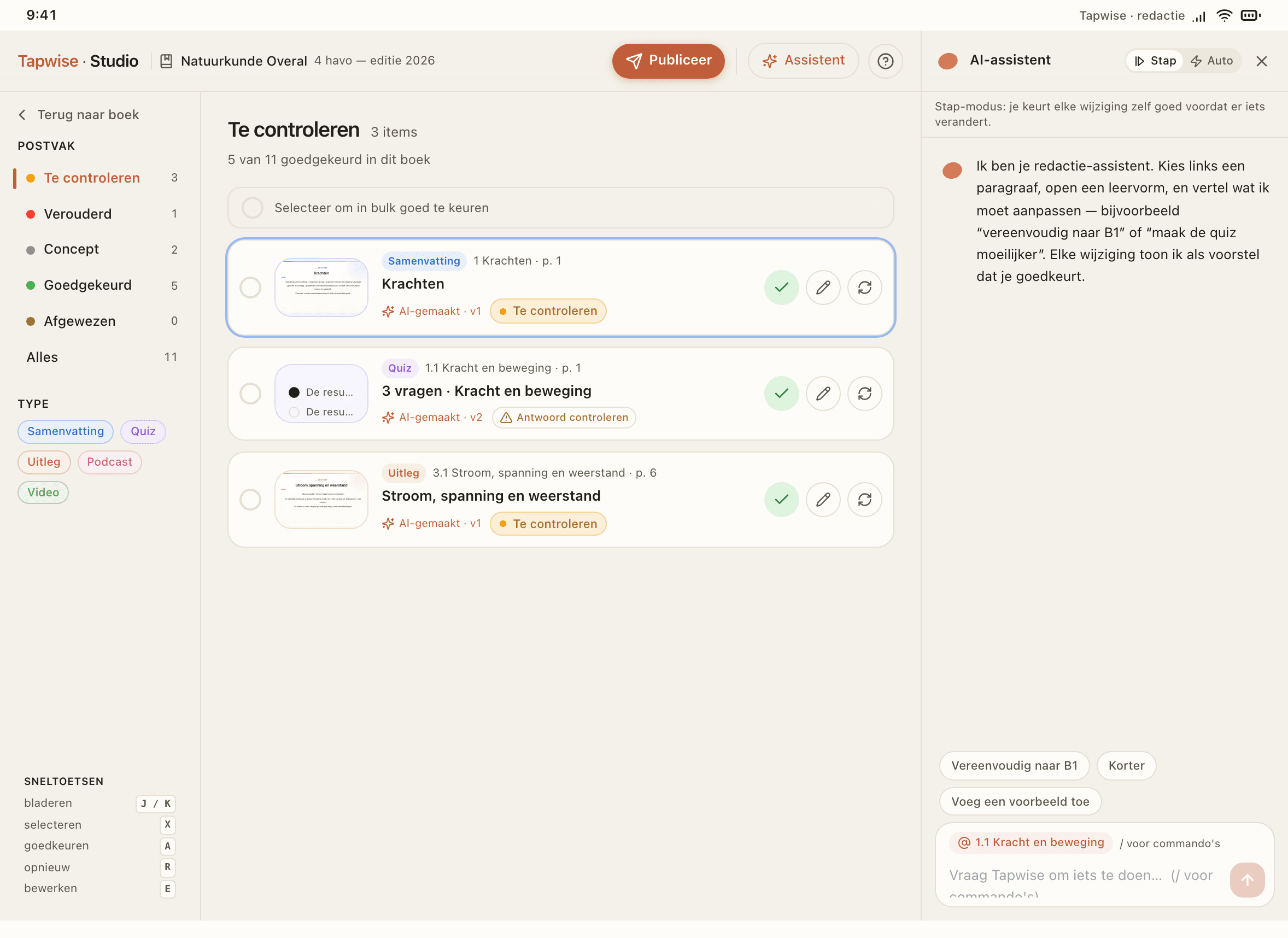
Studio example in Dutch: editors review learning material and proposed changes.
A look inside Studio, your editorial workspace.

Foundation

One foundation for your editorial team

Foundation combines Engine, library and Studio in one base licence. Your team creates learning formats from your own sources, manages them by chapter and reviews what is ready to publish.

Foundation: the learning layer

Engine

Processes your source and generates lesson material from it with AI. Works in the background.

Library

Stores your sources and generated learning formats by chapter, searchable and with version control.

Studio

The web app where your editors generate, edit and approve material.

Your source material

TextbookPDFImages
Engine, library and Studio together form one learning layer that works on top of the publisher's source material.

What you buy

Foundation first, then choose how to deliver

Foundation is the base. Then choose where students and teachers use your material: your existing platform, a student app or a teacher web app under your brand.

For your own content team

Base

Foundation

The base: Engine, library and Studio

What you get

  • Process your source material with the Engine
  • Store and keep every version in the library
  • Generate, edit and review in Studio
  • Personal seats for your editors

How it works

Your team works in Studio. You decide what is good enough to release.

More about Foundation

For your existing online environment

Widgets

Your material in your own platform

What you get

  • Embed widgets that keep working the way they do in Studio
  • Or take raw files (MP3, MP4, PNG, JSON)
  • Or pull material through the API
  • Usage analytics per chapter with widgets

How it works

Choose how you integrate: ready-made widgets, raw files or the API. With widgets you also get usage data back.

More about Widgets

For students, web and mobile

Tap4Students

White-label app for students

What you get

  • One app for web and mobile
  • Your name and branding
  • Every learning format from your library, widgets included
  • Usage analytics

How it works

Students use your app and the material comes from your library. The widgets are already built in, so you don't need the Widgets module on top.

More about Tap4Students

For teachers working with your material

Tap4Teachers

White-label web app for teachers

What you get

  • Build lesson slides from your library
  • Access to the material in your library
  • Your name and branding
  • Usage analytics

How it works

Ready-made decks rarely fit a class exactly. So a teacher composes their own lesson from your library, with your material and the freedom to teach it their own way.

More about Tap4Teachers

A module does not work without Foundation. Choose white-label hosting (Tap4Students) and the widgets are already included. Prefer your own platform, and you integrate through widgets, raw files or the API. Only widgets and apps give usage data back. What you pay per module depends on your reach; we work that out together.

Interactive learning formats for your platform

A podcast player or quiz is a widget: the interactive view of your material. The Widgets module brings it to your existing platform.

We choose which widgets fit each title and audience with you.

Quality

Your editors keep quality control

The Engine makes a proposal. Your editors check generated learning formats in Studio for accuracy, level and question quality before publication. Live Tutor answers need separate safeguards.

Faithful to the source

Your editors check claims against the source material and revise them where needed.

Right level

Your editors assess whether language, examples and difficulty suit the audience you specify.

Unambiguous questions

Your editors check that questions have one correct answer and clear distractors, and that answer checking matches the source.

The student does the thinking

Your editors assess whether the material encourages students to think for themselves and gives enough support.

TutorExample

Why are dikes not enough?

Dikes hold water back, but rain and river water also need somewhere to go. That is why pumping stations and water storage belong to the same system.

Source: Chapter 3, §2
Review criteria
  • Stays with the source
  • Right level
  • The student does the thinking
  • Factually correct
An example Tutor answer with a source reference, next to four criteria for assessing live answers.

Module comparison

What's in each module?

Compare what each module adds to Foundation: creating and managing material, delivery and usage insights.

Compare all features
FoundationBase

Create & manage

  • Process source material with the Engine
  • Store & keep every version in the library
  • Generate, edit & review in Studio
  • Editorial approval before publishing
  • Seats for your editors
Widgets

Deliver & reach

  • Embed widgets in your own platform
  • Take raw files (MP3, MP4, PNG, JSON)
  • Pull material through the API

Brand & insight

  • Usage analytics
Tap4Students

Deliver & reach

  • One app for students (web + mobile)
  • Every learning format from your library, widgets included

Brand & insight

  • Your name and branding
  • Usage analytics
Tap4Teachers

Deliver & reach

  • Web app for teachers
  • Build lesson slides from your library
  • Access to your library for teachers

Brand & insight

  • Your name and branding
  • Usage analytics

A module does not work without Foundation; the base is always underneath. Choose Tap4Students and the widgets are already built into the app, so you don't need the Widgets module separately.

IncludedNot in this module

Frequently asked questions

The key questions about Tapwise for publishers.

What does Tapwise cost?+

We discuss your titles, reach, chosen modules and pilot scope. Foundation is the base; you then choose how to reach students and teachers. We use these choices to prepare a proposal.

How do you handle our content?+

Your own source material is the starting point. We agree on use, rights and processing before starting.

Do we stay in control of what gets published?+

Your editors review and edit generated learning formats in Studio before publication. Live Tutor answers require separate safeguards.

How do we start?+

Start with a demo of the workflow and learning formats. For a pilot, we choose source material, audience and desired outputs together. We agree on scope, support and delivery before starting.

Can students and teachers use it too?+

Foundation is for your content team. You then choose how to reach students and teachers: through your platform, Tap4Students or Tap4Teachers. We discuss which options fit your pilot.

What does Tapwise add to standalone AI tools?+

Tapwise brings creating, editorially reviewing and delivering learning material together. You work from your own sources and choose how students and teachers reach the material under your brand.

Explore a pilot with your own material

Tell us which title or chapters you want to use. A demo explores learning formats, editorial review and delivery. We then agree on the scope and terms of a pilot together.

Milan Scheepers, Sales and customer support